

The best Copilot prompt patterns are not magic phrases. They are repeatable ways to give Microsoft 365 Copilot a clear goal, useful context, the right source material, and a specific output format so your team can move from “interesting answer” to “usable work.”1, 2, 3

Turn Copilot from a tool into a governed workflow.
Get a Copilot readiness consult to identify the fastest productivity wins, the biggest data risks, and the prompt patterns your teams should standardize first.
Book a Consultation Get the Copilot GuideMost teams start using Copilot the same way they search the web: a short sentence, a vague request, then frustration when the answer is too broad. That is understandable. Copilot feels conversational, and Microsoft encourages natural language. But useful business prompting still benefits from structure.
For Canadian SMBs and mid-market organizations, the stakes are higher than simple productivity. Copilot works across Microsoft 365 apps and can ground responses in emails, chats, meetings, documents, and other Microsoft Graph-connected content that a user is allowed to access.4 That makes strong prompts valuable, but it also makes governance, permissions, retention, sensitivity labels, and user training essential.
The goal is not to turn every employee into a “prompt engineer.” The goal is to give teams a simple set of patterns they can use safely and repeatedly. Four patterns cover most high-value work: summarize, draft, analyze, and decide.
The simple rule: a strong Copilot prompt should tell Copilot what you want, why you want it, what source it should use, and how the answer should be formatted. Microsoft describes these ingredients as goal, context, source, and expectations.1, 3
What are Copilot prompt patterns?
Copilot prompt patterns are reusable prompt structures for common business outcomes. Instead of starting from a blank box, a team uses a consistent template for a task type.
Summarize
Turn meetings, documents, email threads, chats, or project updates into concise takeaways.
Draft
Create a first version of an email, proposal, policy, brief, agenda, or communication plan.
Analyze
Compare options, extract themes, identify risks, find gaps, or interpret structured information.
Decide
Convert information into a recommendation, tradeoff summary, next step, or decision brief.
These patterns work because they mirror how business teams already operate. A manager needs a meeting summarized. A sales leader needs a follow-up drafted. A finance team needs contract changes analyzed. An operations team needs a decision path. Copilot can support each workflow, but only when the prompt narrows the task enough to produce something actionable.
The four-part prompt formula business teams should standardize
Before the patterns, teach the formula. Microsoft’s prompting guidance repeatedly points to four ingredients: goal, context, source, and expectations.1, 2, 3
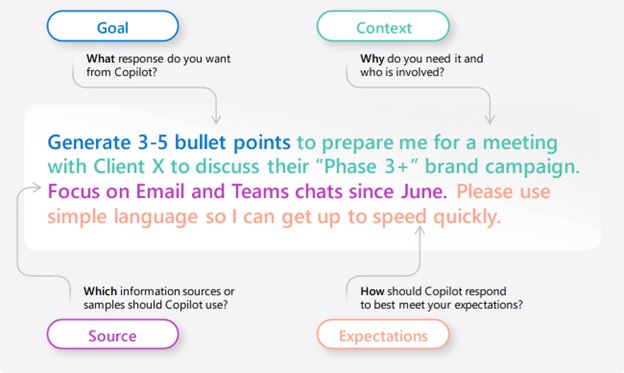
| Prompt ingredient | What it answers | Business example |
|---|---|---|
| Goal | What do you want Copilot to do? | “Summarize the key risks from this project update.” |
| Context | Why do you need it, and who is the audience? | “This is for an executive update to the COO.” |
| Source | What should Copilot use? | “Use the attached proposal, last week’s meeting recap, and the latest email thread.” |
| Expectations | How should the output look? | “Return five bullets, each with risk, impact, owner, and next step.” |
Teams do not need all four elements every time. But if the first answer is too vague, the missing ingredient is usually obvious. No source creates generic output. No context creates the wrong tone. No expectation creates the wrong format. No goal creates a wandering answer.
Pattern 1: Summarize
Use the summarize pattern when the input is longer than the time available to review it. Good use cases include Teams meeting recaps, vendor proposals, project updates, RFP responses, email threads, policy drafts, and long documents. In Teams meetings, Copilot can summarize key discussion points, suggest action items, and answer questions during or after a meeting depending on meeting and transcription settings.8
When to use it
- You missed a meeting and need the practical takeaways.
- You need a quick executive summary of a long document.
- You need to turn an email chain into actions and owners.
- You need to extract open questions before a client call.
- You need a briefing note before making a decision.
Summarize [source] for [audience].

Focus on:
1. The main points
2. Decisions already made
3. Open questions
4. Risks or blockers
5. Action items with owners and dates

Keep the tone [executive / practical / client-ready / plain language].
Return the answer as [bullets / table / email draft / briefing note].
Business-ready example
Summarize the latest Teams meeting and related chat for our Copilot rollout project.

Audience: COO and IT manager.
Focus on decisions, unresolved risks, data governance concerns, and action items.
Return a table with columns for topic, takeaway, owner, due date, and risk level.
Use plain language and keep it under 300 words.
How to improve the answer
After the first summary, follow up with a narrowing prompt. Microsoft’s guidance recommends keeping the conversation going by asking follow-up questions to tailor the result.1
Now rewrite the summary for a non-technical executive.
Keep only the decisions, risks, and next steps.
Add one sentence explaining why the data governance risk matters.
Best practice: ask Copilot to separate “confirmed facts” from “possible interpretations.” This is especially helpful when the source material includes disagreement, uncertainty, or incomplete context.
Pattern 2: Draft
Use the draft pattern when the task is clear but the first version is slow to create. Copilot can help draft emails, agendas, project briefs, internal announcements, client updates, training outlines, job aids, and policy language. Microsoft’s own prompt examples include creating, editing, transforming, and generating content.1, 2
When to use it
- You know the message but need a clear first draft.
- You need to adapt one message for different audiences.
- You need to turn meeting notes into a client follow-up.
- You need a policy or process draft based on existing source material.
- You need a more concise version of a long internal update.
Draft a [type of content] for [audience] about [topic].

Use [source material].
The purpose is to [business outcome].
The tone should be [tone].
Include [required points].
Avoid [things to avoid].
Return it in [format] with [length or structure].
Business-ready example
Draft an internal announcement for department heads about our upcoming Microsoft 365 Copilot pilot.

Use the project brief and the AI usage policy draft.
The purpose is to explain why we are piloting Copilot, what data employees should not paste into AI tools, and how managers should nominate users.
Tone: confident, practical, and reassuring.
Include a short “what changes now” section and a “what stays the same” section.
Keep it under 500 words.
Drafting guardrails
A draft is not a final approval. Treat Copilot output as a starting point that needs review for accuracy, tone, legal sensitivity, and confidentiality. This matters even more for regulated organizations, HR messages, legal content, security communications, and anything involving customer data.
For teams building repeatable AI workflows, pair prompt training with clear AI governance, approval rules, and change control. Prompt quality improves output, but governance determines whether the output is safe to use.
Pattern 3: Analyze
Use the analyze pattern when the team needs interpretation, not just summary. Analysis prompts work well for comparing options, finding gaps, extracting themes, identifying risks, reviewing feedback, checking inconsistencies, and turning qualitative input into structured findings.
Microsoft’s Copilot architecture explains that grounding helps make prompts more specific and relevant to the user’s task, and that Copilot can use Microsoft Graph data in the user’s context when the user has permission to access it.4 That makes the source instruction especially important. Tell Copilot exactly what to analyze.
Analyze [source] to identify [analysis target].

Use this lens:
- [criterion 1]
- [criterion 2]
- [criterion 3]

Separate the answer into:
1. Findings
2. Evidence from the source
3. Business impact
4. Recommended next step

Call out anything uncertain or unsupported.
Business-ready example
Analyze the last 90 days of helpdesk feedback and meeting notes related to our current IT provider.

Look for recurring themes around response time, unresolved issues, security concerns, communication gaps, and business disruption.
Return a table with theme, evidence, severity, business impact, and recommended next step.
Do not assume causes that are not supported by the source material.
This type of prompt is useful before a vendor review, quarterly business review, MSP transition, or leadership discussion. If the output suggests deeper IT service issues, compare the findings against common warning signs that it may be time to switch providers.
Use analysis prompts to reduce AI risk too
Analysis prompts are also valuable for AI governance. For example, IT can ask Copilot to review a draft AI usage policy for missing approval steps, unclear ownership, or weak data-handling language. Security teams can use AI testing and red team style exercises to evaluate how prompts behave under pressure. OWASP lists prompt injection, sensitive information disclosure, excessive agency, and overreliance among major LLM application risks.10
For organizations formalizing AI controls, pair prompt training with AI testing and prompt attack simulations. It is better to find unsafe patterns during a pilot than after staff have already built habits around them.
Pattern 4: Decide
Use the decide pattern when information needs to become a recommendation. Copilot should not make accountable decisions for the business. It can, however, help structure the decision by clarifying options, tradeoffs, assumptions, risks, and next steps. Microsoft’s responsible AI principles emphasize accountability, privacy and security, reliability and safety, fairness, inclusiveness, and transparency.12
Help me prepare a decision brief about [decision].

Use [source material].
Compare these options:
- Option A
- Option B
- Option C

Evaluate each option against:
- Cost
- Risk
- Time to value
- Security impact
- Change management effort

Return:
1. Recommended option
2. Why it is recommended
3. Key tradeoffs
4. Risks to mitigate
5. Questions leadership should answer before approval
Business-ready example
Help me prepare a decision brief on whether to expand Microsoft 365 Copilot from a 20-user pilot to a 100-user rollout.

Use the pilot feedback, support tickets, training attendance, and draft AI governance plan.
Evaluate readiness across user adoption, data governance, licensing, security controls, support capacity, and business value.
Return a recommendation, the top three risks, and a 30-day action plan before rollout.
Decision prompts are strongest when the team has already done the readiness work. Before scaling Copilot, review your Microsoft 365 permissions, SharePoint access, Teams sprawl, sensitivity labels, retention policies, user training, and support process. A Copilot readiness checklist helps prevent the most common rollout problem: giving users AI access before the data environment is ready.
Give your team safe, repeatable Copilot habits.
MSP Corp helps organizations prepare their Microsoft 365 environment, build governance guardrails, and roll out Copilot workflows that support real business outcomes.
Book a ConsultationA practical Copilot prompt library for business teams
The best way to drive adoption is to give each team a small set of approved prompts for real workflows. Start with the work that already consumes time every week.
| Team | Prompt pattern | High-value use case | Governance reminder |
|---|---|---|---|
| Leadership | Summarize, decide | Board updates, initiative briefs, risk summaries | Confirm assumptions and source quality before decisions. |
| Operations | Analyze, decide | Process bottlenecks, service issues, vendor comparisons | Separate evidence from interpretation. |
| Finance | Analyze, draft | Budget narratives, variance explanations, renewal summaries | Review numbers against source systems. |
| HR | Draft, summarize | Policy drafts, training summaries, employee communications | Use approved policy sources and review sensitive language. |
| Sales | Summarize, draft | Account briefs, meeting follow-ups, proposal outlines | Do not expose confidential client details in unmanaged AI tools. |
| IT | Analyze, decide | Change plans, ticket themes, rollout readiness, incident reviews | Validate security and technical recommendations before action. |
How to make prompts safer without making them harder
Prompting is a productivity practice, but it is also a security habit. Microsoft states that Copilot respects Microsoft 365 identity, permissions, sensitivity labels, retention policies, audit capabilities, and administrative settings, depending on the subscription plan and configuration.6 Microsoft also notes that Copilot interaction data can be discovered, audited, and retained using Microsoft Purview capabilities.5
Those controls help, but they do not replace good governance. Copilot can surface content a user can access. If too many users have access to sensitive files, Copilot can make that oversharing more visible. Microsoft’s data readiness guidance specifically points administrators toward protecting organizational data in SharePoint, Purview, and other apps.7
For more mature environments, connect these practices to your broader data governance and compliance program. If the organization is already struggling with unmanaged file shares, unclear ownership, or broad access to confidential folders, Copilot readiness should include remediation before enterprise-wide rollout.
Prompt patterns for common business scenarios
1. Meeting recap to action plan
Summarize this meeting for the project team.

Return:
1. Decisions made
2. Action items with owner and due date
3. Risks or blockers
4. Questions that need follow-up
5. A short email I can send to attendees

Keep it practical and avoid filler.
2. Executive brief from a long document
Create an executive brief from this document.

Audience: CEO, COO, and CFO.
Include:
- What changed
- Why it matters
- Financial or operational impact
- Risks
- Recommended next steps

Keep it under one page and use plain language.
3. Client follow-up after a sales call
Draft a client follow-up email based on this meeting recap.

Tone: helpful, concise, and professional.
Include:
- Thank you
- Their main goals
- Their concerns
- The next step we agreed on
- A clear call to action

Do not invent commitments, pricing, or timelines that are not in the recap.
4. Policy review for gaps
Review this AI usage policy draft for gaps.

Evaluate it against:
- Data privacy
- Confidential information
- Approval workflow
- Employee training
- Incident reporting
- Use of external AI tools

Return a table with gap, why it matters, suggested fix, and priority.
5. Decision brief for a technology rollout
Prepare a decision brief for leadership on whether to proceed with this technology rollout.

Use the rollout plan, risk register, and pilot feedback.
Compare:
- Proceed now
- Proceed after remediation
- Pause the rollout

Evaluate cost, business value, data risk, user readiness, support capacity, and change management effort.
End with a recommendation and the top five actions required before approval.
Common Copilot prompting mistakes
| Mistake | Why it fails | Better approach |
|---|---|---|
| “Summarize this.” | Too broad. Copilot does not know the audience or desired depth. | Specify the audience, focus areas, and format. |
| Asking for too many tasks at once | Multi-intent prompts are harder to evaluate and can blur the result. | Use one prompt for one primary outcome, then follow up.9 |
| No source named | The response may be generic or may use the wrong context. | Name the document, meeting, thread, file, or timeframe. |
| No review step | Output may sound polished but still need validation. | Ask for assumptions, uncertainties, and evidence from the source. |
| Using unmanaged AI tools for sensitive work | Creates data boundary and governance risk. | Use approved tools and policy-backed workflows. |
One useful team habit is to add a final line to important prompts: “State what you are uncertain about and what source you used.” This small addition helps reviewers see where the answer may need verification.
How IT should support business prompt adoption
Prompt training cannot live only in IT. The best prompt library is built with the people doing the work: department leaders, power users, compliance owners, and support teams. Microsoft’s 2025 Work Trend Index for Canada found that leaders are rethinking how work gets done, and that 78% of Canadian leaders said 2025 was a pivotal year to revisit core strategies and operations.13 That shift makes Copilot adoption an operating model issue, not just a software rollout.
Build the rollout in five steps
- Choose priority workflows. Start with time-consuming, repeatable tasks such as meeting summaries, client follow-ups, ticket analysis, and policy drafts.
- Map acceptable source data. Define which files, workspaces, and systems are approved for each workflow.
- Create team prompt cards. Give each department 5 to 10 copy-ready prompts with examples.
- Train reviewers. Teach managers how to check Copilot output for accuracy, sensitivity, and missing context.
- Measure adoption and risk. Track usage, support tickets, prompt quality, time saved, and any data handling concerns.
If your Microsoft 365 administration is already stretched, review your weekly, monthly, and quarterly operating tasks before adding AI workflows. A strong Microsoft 365 administration checklist gives Copilot a safer foundation because identity, access, retention, and collaboration settings are already being maintained.
How to measure whether prompt patterns are working
Do not measure Copilot success only by the number of prompts submitted. A team can generate lots of low-value prompts and still not improve productivity. Measure whether prompt patterns reduce friction in real work.
| Measure | What to look for | Example signal |
|---|---|---|
| Time saved | Tasks that move faster without adding review burden | Meeting follow-up drafted in 5 minutes instead of 30 |
| Output quality | Fewer rewrites, clearer structure, better completeness | Managers approve first drafts with minor edits |
| Decision speed | Faster movement from information to action | Decision briefs accepted in leadership meetings |
| Risk reduction | Fewer unsafe AI behaviours | Users name approved sources instead of pasting sensitive data into unmanaged tools |
| Support demand | Common questions decline after training | Fewer tickets about Copilot access, outputs, and data concerns |
The goal is not more AI. The goal is better work with less risk.
Ready to make Copilot useful across the business?
Book a Copilot readiness consultation with MSP Corp. We will help you assess your Microsoft 365 environment, prioritize safe use cases, and create prompt patterns your teams can actually use.
Book a Consultation Explore Copilot ServicesRecommended next steps
If your team is early in the Copilot journey, start with three actions:
- Pick one department and one workflow. For example, operations meeting summaries or sales follow-up emails.
- Give users approved prompt patterns. Do not expect every employee to invent a good prompt from scratch.
- Review the data foundation. Confirm permissions, retention, sensitivity labels, and user training before scaling.
For deeper planning, use the Microsoft 365 Copilot guide, review effective Copilot prompting techniques, and align your rollout with measurable business value.
Frequently asked questions
What is the best Copilot prompt pattern for beginners?
The summarize pattern is usually the easiest starting point because the source material already exists. Ask Copilot to summarize a meeting, document, or email thread for a specific audience, then request actions, risks, and open questions.
Do employees need prompt engineering training to use Copilot?
They do not need technical prompt engineering training, but they do need practical prompting habits. Teach goal, context, source, and expectations, then give each department a small library of approved prompts.
Can Copilot see all company data?
No. Microsoft states that Copilot only accesses data an individual user is authorized to access based on existing Microsoft 365 access controls.4 However, if permissions are too broad, Copilot may surface content the user technically can access but should not need. That is why data governance matters.
Are Copilot prompts used to train Microsoft foundation models?
Microsoft states that prompts, responses, and data accessed through Microsoft Graph are not used to train foundation models.6, 7
What should IT do before a Copilot rollout?
Review identity, permissions, SharePoint and Teams access, sensitivity labels, retention, data loss prevention, user training, support processes, and AI governance. Then pilot Copilot with a defined group before broad rollout.
Related reading
References
- Microsoft Support, “Cooking up a great prompt: Getting the most from Copilot”
- Microsoft Support, “Learn about Copilot prompts”
- Microsoft Learn, “Write Effective Prompts to Achieve Optimal Results”
- Microsoft Learn, “How does Microsoft 365 Copilot work?”
- Microsoft Learn, “How data is protected and audited in Microsoft 365 and Microsoft 365 Copilot”
- Microsoft Learn, “Enterprise data protection in Microsoft 365 Copilot and Microsoft 365 Copilot Chat”
- Microsoft Learn, “Microsoft 365 Copilot data and compliance readiness”
- Microsoft Support, “Use Copilot in Microsoft Teams meetings”
- Microsoft Learn, “Design evaluation prompts for Copilot agent evaluation”
- OWASP, “Top 10 for Large Language Model Applications”
- NIST, “Artificial Intelligence Risk Management Framework: Generative Artificial Intelligence Profile”
- Microsoft, “Responsible AI Principles and Approach”
- Microsoft Source Canada, “2025: The Year the Frontier Firm Arrives in Canada”