

If Microsoft 365 Copilot, AI agents, or external genAI tools are already in your environment, governance is no longer optional. This guide gives IT teams a clear, lightweight governance model that improves speed and reduces risk.
This article is educational and not legal advice. If you operate in a regulated environment, validate AI policy and data handling with privacy and legal counsel.
What AI governance means for IT teams (in plain language)
AI governance is the operating system for deciding who can deploy AI, what data it can touch, how changes get approved, and how you prove it later. In practical IT terms, it is a set of artifacts and workflows that keep AI adoption fast, controlled, and auditable.
A useful governance program borrows from proven frameworks. NIST organizes AI risk management into four functions (govern, map, measure, manage) and treats governance as cross cutting across the lifecycle.1 ISO/IEC 42001 defines an AI management system standard that formalizes policy, objectives, and continual improvement for responsible AI use.2
The minimum viable AI governance stack
Start with these seven components. You can implement all of them without creating bureaucracy.
- AI policy and acceptable use: what is allowed, what is not, and how to handle sensitive data.
- AI inventory: a living register of AI tools, agents, plugins, connectors, datasets, and automations.
- RACI: role clarity for decisions, approvals, testing, and ongoing operations.
- Approval workflow: an intake form plus a predictable path for low, medium, and high risk AI changes.
- Change control: a safe release process, aligned to ITIL change enablement concepts like risk assessment, authorization, and scheduling.3
- Technical guardrails: identity controls, data classification, and monitoring.
- Operating cadence: weekly and monthly governance reviews, with clear owners and metrics.

Deploying Copilot or AI agents this quarter?
Book a Copilot Readiness Consult. We will map your data exposure, security controls, licensing, and governance gaps, then give you a prioritized rollout plan.
Step 1: Build an AI inventory that IT can actually maintain
Most governance fails because nobody can answer a simple question: What AI is in production today? Your inventory should be short, searchable, and owned. Keep it in the same place you already track systems, like your CMDB, a service catalog, or a controlled SharePoint list.
Inventory fields to capture (copy and use)
- Name: tool, model, agent, plugin, connector, automation.
- Business purpose: what outcome it supports and who benefits.
- Data touched: sources, destinations, and whether it can access Microsoft Graph content.
- Access model: which identities can use it, and whether it is scoped by least privilege.
- Risk tier: low, medium, high (see next section).
- Owner: business owner and technical owner.
- Controls: labels, DLP, logging, retention, approvals required.
- Change path: standard change, CAB review, or emergency process.
- Review cadence: quarterly, semi annual, or annually.
Step 2: Define risk tiers that drive approvals (not debate)
Risk tiers prevent endless meetings. They tell you which changes can move fast and which require formal approval. Use the table below as a starter, then tune it to your environment.
| Risk tier | Typical AI examples | Approval requirement | Minimum controls |
|---|---|---|---|
| Low | Internal drafting help, meeting summaries, prompt library for non sensitive data | Service owner approval | Named owners, acceptable use policy, logging enabled |
| Medium | Copilot rollout to a department, agent with limited line of business data, workflow automation | IT + Security sign off | Least privilege, sensitivity labels, DLP baseline, audit review plan |
| High | Agents with broad file access, customer data processing, regulated workflows, external connectors | Security + Privacy + Exec sponsor approval | Data classification enforced, risk assessment, incident response hooks, formal change window |
If you handle sensitive data, build incident response into your AI governance from day one. Your IR plan should define owners, escalation paths, evidence handling, and communications before a data exposure event occurs.4 MSP Corp also provides a practical, Canada focused guide: Incident Response Plan Template (for SMBs).
Step 3: Create an AI RACI that removes ambiguity
RACI works because it forces a single accountable owner per decision. Keep the matrix small and readable. If everyone is accountable, nobody is accountable.
ISACA notes that a RACI matrix is a core tool used in governance toolkits (including COBIT) to clarify responsibility and accountability across enterprise roles.5
RACI: onboarding a new AI capability (tool, agent, or connector)
| Activity | Business owner | IT service owner | Security | Privacy / Legal | Data steward | Service desk |
|---|---|---|---|---|---|---|
| Define use case and success metrics | A | R | C | C | C | I |
| Data access scope and least privilege design | C | R | A | C | R | I |
| Risk tier and controls selection | C | R | A | C | R | I |
| Approval decision (go, no go) | A | R | R | R | C | I |
| Pilot execution and user enablement | R | A | C | I | C | R |
| Go live and change record | I | A | R | I | C | R |
| Ongoing monitoring and quarterly review | A | R | R | C | R | I |
RACI: prompt library and usage standards
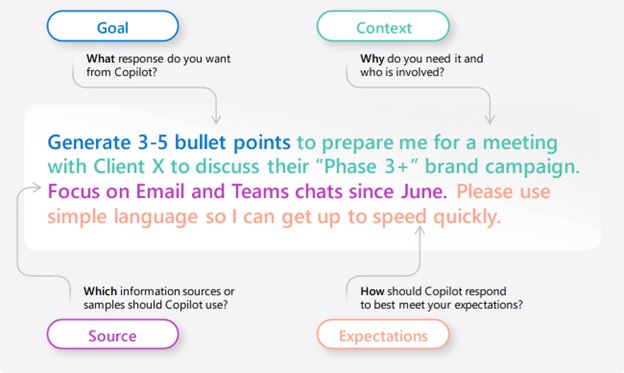
Prompting standards are governance, not training fluff. They reduce accidental data disclosure and improve repeatability.
| Activity | IT service owner | Security | Data steward | HR / Training | Department champions |
|---|---|---|---|---|---|
| Define acceptable use and prohibited data types | R | A | R | C | I |
| Approve a shared prompt library | A | R | R | C | R |
| Create role based prompt packs | R | C | C | C | A |
| Quarterly review and retire prompts | A | R | R | I | R |
Step 4: Build an approvals workflow that matches reality
Approvals fail when they are vague. Your workflow should answer: what gets approved, by whom, in what order, and what evidence is required. Use the risk tiers to route requests automatically.
Approval workflow (copy and adapt)
- Intake: requestor submits an AI change request (new tool, new connector, expanded access, new agent, or new dataset).
- Triage: IT service owner assigns a preliminary risk tier and confirms the business owner.
- Assessment: security and data stakeholders confirm data scope, controls, and monitoring plan.
- Approval: approvals recorded in a ticket, including conditions for release.
- Pilot: limited rollout with logging, success metrics, and user enablement.
- Go live: change record closed with evidence and rollback plan.
- Review: 30 day review, then quarterly or semi annual reviews.
AI change request form (fields that prevent rework)
- Use case: what task it improves and what “done” looks like.
- Who uses it: roles, groups, and licenses.
- Data accessed: SharePoint sites, Teams channels, mailboxes, line of business systems.
- External sharing: any data leaving your tenant, including connectors or third party agents.
- Controls requested: labels, DLP rules, conditional access, retention, restricted sites.
- Logging plan: where audit data will be reviewed and by whom.
- Roll back: how to disable the feature and unwind permissions quickly.
- Impact: downtime, user disruption, and communications plan.
Governance is also a support model decision. If your team needs always on coverage for Copilot adoption, identity incidents, or endpoint changes, read What’s Included in 24/7 IT Support (and What Isn’t) so your expectations, SLAs, and escalation paths are realistic.
Step 5: Treat AI changes as real changes (ITIL aligned change control)
AI changes can impact data exposure, user permissions, and compliance. That makes them change enablement candidates, not informal tweaks. ITIL describes change enablement as maximizing successful changes by ensuring risks are assessed, changes are authorized, and schedules are managed.3
Classify AI changes using three lanes
- Standard AI change: pre-approved, low risk changes with documented steps (example: adding users to an approved Copilot pilot group).
- Normal AI change: requires review and authorization (example: expanding an agent’s access to a new SharePoint site collection).
- Emergency AI change: time sensitive changes to reduce harm (example: disabling a connector after suspected data exposure).
What evidence should a change record include?
- Scope of access before and after (groups, sites, datasets).
- Risk tier and the control set applied.
- Testing evidence (pilot results and known limitations).
- Approval trace (who approved and when).
- Rollback steps that a second person can follow.
Step 6: Use Microsoft 365 controls to enforce governance (Copilot included)
For Microsoft 365 Copilot, governance is only as strong as your existing identity and data permissions. Microsoft states that Copilot only surfaces organizational data a user already has at least view permissions to, so overshared content becomes an AI exposure problem.6
Four controls that deliver the fastest risk reduction
- Permission hygiene: fix overshared SharePoint sites, public Teams, and broad link sharing.
- Sensitivity labels: Purview sensitivity labels are recognized by Microsoft 365 Copilot and Copilot agents, and can enforce usage rights when encryption is applied.7
- Auditing: Purview audit logs capture Copilot and AI application interactions and admin activities for traceability.8
- DLP and retention: baseline DLP policies, plus retention and eDiscovery readiness for investigations.
Copilot governance reality check
- Tenant boundary matters: Microsoft states prompts, responses, and data accessed through Microsoft Graph are not used to train foundation models for Microsoft 365 Copilot.6
- Extensibility increases risk: agents and connectors can introduce new data flows. Treat every new connector like a high visibility change request.
For a practical implementation order, start with the Microsoft 365 Copilot Readiness Checklist (Data, Security, Licensing), then align ongoing operations to the Microsoft 365 Administration Checklist: Weekly, Monthly, Quarterly Tasks.
Operating cadence: keep governance alive (without meetings that drag)
Governance fails when it becomes a one time document. Give it a rhythm.
Weekly (15 to 30 minutes)
- Review new AI requests, assign risk tiers, and confirm owners.
- Review audit signals for unusual usage or new high risk access patterns.
- Confirm upcoming changes and user communications.
Monthly (45 to 60 minutes)
- Review Copilot adoption and top use cases by department.
- Review DLP and label coverage gaps, then assign fixes.
- Review support tickets and update prompt packs and user guidance.
Quarterly (90 minutes)
- Review high risk AI inventory items and revalidate access scope.
- Run a tabletop on an AI related incident scenario.
- Update policy, controls, and change templates based on lessons learned.
Common AI governance failure modes (and how to avoid them)
- No single accountable owner: fix it with RACI and make the business owner accountable for value and risk acceptance.
- Permissions are a mess: Copilot will not fix oversharing. Your governance must include a permission cleanup backlog.
- Approvals do not match risk: use tiers to reduce friction for low risk changes and increase rigor for high risk ones.
- Support is under-scoped: evaluate whether it is time for a different support model or partner. See When to Switch MSPs: 12 Red Flags and a Transition Checklist.
A 90 day rollout plan you can execute
Days 1 to 15: establish control
- Publish acceptable use and the “never include” data list.
- Stand up the AI inventory with owners and risk tiers.
- Turn on auditing and confirm who reviews it weekly.8
Days 16 to 45: enforce guardrails
- Permission cleanup for overshared content.
- Deploy sensitivity labels for critical data and validate Copilot behavior with labeled items.7
- Build standard AI changes and pre-approvals for low risk actions.
Days 46 to 90: scale safely
- Expand Copilot to more teams using the approval workflow and change windows.
- Formalize quarterly governance reviews and a lightweight CAB for high risk items.
- Run an AI incident tabletop and update your IR plan. Use MSP Corp’s template if helpful: Incident Response Plan Template (for SMBs).
Want this governance model applied to your tenant?
MSP Corp can help you establish Copilot governance, map data exposure, implement Purview controls, and operationalize approvals and change control so adoption is fast and defensible.
FAQ
Do we need a new governance committee for AI?
Usually no. Start by extending your existing change advisory and security governance. Add privacy and data stewardship only for medium and high risk AI items.
Is Copilot safe if we have Microsoft 365 permissions set correctly?
Permission hygiene is the foundation. Microsoft states Copilot only surfaces organizational data a user has at least view permissions to, so overshared content increases exposure.6 Governance adds labels, DLP, auditing, and a controlled rollout plan.
What is the fastest first win for AI governance?
Create the AI inventory, assign owners, enable auditing for Copilot and AI apps, and fix overshared content. Then implement a simple risk tier routing process for approvals.
How do we keep AI governance from blocking progress?
Use risk tiers and pre-approved standard changes. Low risk changes should be fast. High risk changes should be deliberate, documented, and reversible.
Sources
- NIST. Artificial Intelligence Risk Management Framework (AI RMF 1.0). PDF.
- ISO. ISO/IEC 42001:2023 Information technology – Artificial intelligence – Management system. ISO overview.
- AXELOS. ITIL 4 Practitioner: Change Enablement. AXELOS page.
- NIST. SP 800-61 Rev. 3, Incident Response Guidelines. CSRC.
- ISACA. COBIT tool kit enhancements. ISACA.
- Microsoft Learn. Data, Privacy, and Security for Microsoft 365 Copilot. Microsoft Learn.
- Microsoft Learn. Learn about sensitivity labels. Microsoft Learn.
- Microsoft Learn. Audit logs for Copilot and AI applications. Microsoft Learn.